


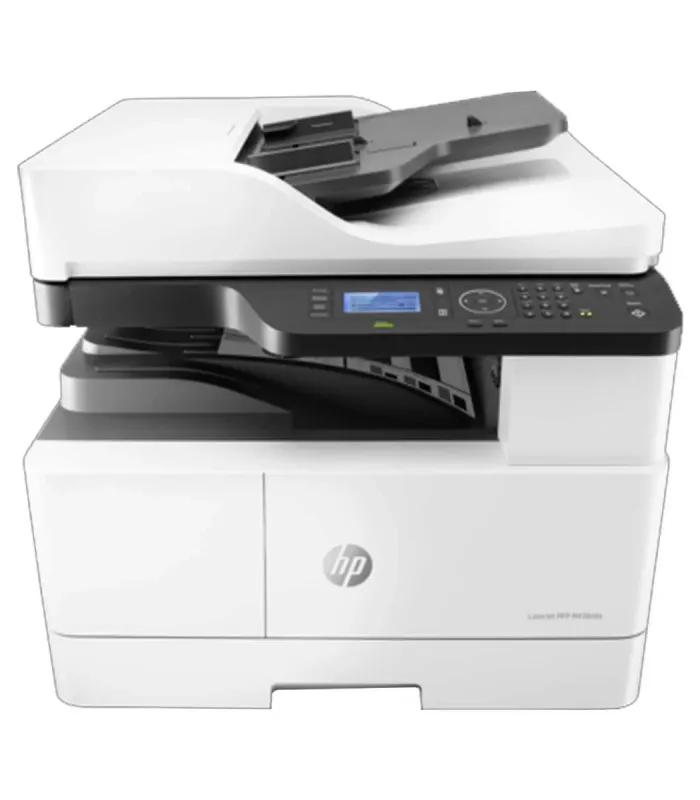
Printer Price in Bangladesh: What Should You Buy?
Printer Price in Bangladesh is shaped less by the box price than by the work you expect the machine to do. In the current ClickBD crawl, observed prices run from ৳ 12,800 to ৳ 989,000, while the category shows 170 listings. The lower end includes compact mono laser choices; higher bands include colour, A3 and business multifunction machines. Use the filters above first, then compare two models with the same print type and workload rather than choosing only the cheapest printer.
For a home or student setup, start with ink tank printers or a simple multifunction model. For frequent black-and-white office pages, compare laser printers. The right answer changes when you add WiFi, automatic duplex, A3 media, scanning, copying or specialist labels.
Printer Price Bands in Bangladesh
Price bands are more useful than a single “best printer” because ClickBD carries machines for very different jobs. The examples below are current crawl prices and can move with stock and seller changes.
| Band | Tier | Who it suits | Example | Price |
|---|---|---|---|---|
| ৳ 12,800–৳ 20,000 | Entry mono | Basic document printing | Pantum BP2310 mono laser printer | ৳ 12,800 |
| ৳ 18,000–৳ 30,000 | Home/office multifunction | Print, scan and copy | Pantum M7100DW | ৳ 28,700 |
| ৳ 22,000–৳ 45,000 | Colour ink tank | Regular colour and mixed documents | Brother MFC-T930DW | ৳ 40,200 |
| ৳ 40,000–৳ 90,000 | Business colour/A3 | Higher output and wider media | Brother MFC-L8690CDW | ৳ 66,000 |
| ৳ 100,000+ | Professional | A3 and heavy business workflows | Epson WorkForce Enterprise AM-C4000 | ৳ 989,000 |
Specs That Actually Change the Decision
Laser vs ink tank vs inkjet
Laser is usually the more natural direction when your workload is dominated by text documents and frequent mono printing. Ink tank makes more sense when colour pages are regular and refillable ink is important. Cartridge inkjet can suit lighter or occasional colour work, but the consumable model deserves attention.
Suggested product
Print, scan and copy
A multifunction printer can replace a separate scanner for everyday forms, assignments and office paperwork. If you rarely scan or copy, a print-only model keeps the machine simpler. If several people share one device, the extra functions can save desk space and repeated trips to another machine.
Suggested product
Print speed and duty cycle
Speed matters when people are waiting for pages, but a high ppm number does not automatically make a printer suitable for your office. Check the machine's intended workload and monthly duty cycle. The Pantum M7100DW page, for example, lists 33ppm A4 and a duty cycle up to 60,000 pages, so its positioning is clearly beyond occasional home printing.
Suggested product
Automatic duplex
Automatic duplex prints both sides without manually turning each sheet. It is useful for reports, proposals, notes and internal documents. If you mostly print single-page forms or receipts, paying extra for duplex may not improve your daily workflow.
Suggested product
Connectivity
USB suits a fixed computer. WiFi becomes valuable when a family, classroom or office needs shared printing without moving the laptop to the printer. LAN can be useful in a wired office network. Check the exact interface list rather than assuming every “wireless” printer supports every device.
Suggested product
Paper size and media
A4 covers most home and office documents. A3 becomes useful for larger spreadsheets, drawings and posters. Specialist work can require label media, card stock, roll paper or other formats. Do not buy an A4-only printer when the workflow genuinely needs A3 or specialist media.
Suggested product
Resolution and output
DPI is not the only measure of print quality, but it matters for fine text, graphics, photos, labels and cards. For routine documents, prioritise dependable workflow and running cost. For photo or design work, compare the printer's actual media support and colour-oriented specifications instead of choosing by dpi alone.
Suggested product
Running cost
Compare toner, cartridge, ink bottle, drum, ribbon, paper and specialist media before buying. A printer that is cheaper today can be more expensive over months if its supplies are costly or difficult to source. For a business, calculate the supply path before approving the machine.
Suggested product
Specialist printing
Receipts, barcode labels, ID cards and large-format drawings need different hardware from ordinary A4 documents. A normal office printer is not automatically a good POS, label or card printer. Start with the output media, then choose the technology.
Suggested product
Printer Brand Landscape
| Brand | Observed direction | Best comparison angle |
|---|---|---|
| Pantum | Strong observed presence in current laser crawl | Mono laser, multifunction and colour laser value |
| Brother | Broad observed laser and ink-tank range | Office multifunction, duplex and colour options |
| Epson | Strong observed ink-tank and specialist range | EcoTank, A3, photo and business MFP directions |
| Canon | Observed in laser and ink-tank categories | Compare model-by-model on function and output |
| HP | Observed strongly in the laser subcategory | Office laser and multifunction comparison |
Do not assume one brand is best for every job. The live category shows meaningful differences between mono laser, colour laser, ink tank, photo, dot matrix and A3 equipment. Compare the exact model's supplies, functions and warranty rather than using the brand name as a shortcut.
Budget-Band Printer Picks
ENTRY MONO
৳ 12,800–৳ 20,000
- Pantum BP2310 — ৳ 12,800
- Good starting direction for straightforward mono documents.
HOME OFFICE
৳ 18,000–৳ 30,000
- Pantum M7100DW — ৳ 28,700
- Useful direction when scan/copy and shared printing matter.
COLOUR WORK
৳ 22,000–৳ 45,000
- Brother MFC-T930DW — ৳ 40,200
- Compare colour ink-tank workflow and WiFi convenience.
BUSINESS
৳ 40,000–৳ 90,000+
- Brother MFC-L8690CDW — ৳ 66,000
- For higher-demand colour multifunction workflows.
Bangladesh-Specific Printer Buying Practicalities
Power and voltage: A printer is a mains-powered electronic device, so the exact input specification should be checked before connection. Where a workplace experiences noticeable voltage instability, ask the seller or manufacturer what protection is recommended for the specific model rather than assuming every printer needs the same stabilizer.
Load-shedding and IPS: If the printer will run through an IPS or backup system, check the printer's rated power requirement and the IPS's continuous output capability. Do not choose an IPS solely by its battery capacity; the inverter must also handle the connected load and startup behaviour of the printer.
Warranty and service: A low purchase price is less attractive for a business if support is difficult to access. Confirm whether the exact listing carries manufacturer warranty, seller warranty or another arrangement, and ask how service is handled in Dhaka or Chattogram before committing to a high-value machine.
Official versus unofficial warranty: Treat these as different ownership propositions. An official warranty may have defined manufacturer service routes, while an unofficial arrangement can depend more heavily on the seller. The product page for the Pantum M7100DW currently shows a 1-year manufacturer warranty, but warranty terms should be rechecked at checkout. citeturn3view0
EMI and payment: Do not assume every printer or seller supports the same EMI terms. Check the live offer attached to the exact model, especially for expensive A3 or business printers.
Delivery and installation: Compact A4 printers are usually simpler to place, while larger business or A3 machines can require more careful delivery planning and a suitable work surface. For professional models, confirm whether setup, network configuration or installation support is included before ordering.
Monsoon humidity: Bangladesh's humid periods make sensible storage important for paper and consumables. Keep paper dry, protect the printer from direct moisture and follow the manufacturer's storage and operating guidance for ink, toner and media.
Spare parts and import effects: Specialist printers can have a higher ownership burden because drums, print heads, ribbons, rollers or media may be model-specific. Imported equipment can also move in price as supply, currency and import costs change, so compare the current price and the likely availability of consumables before buying.
Common Printer Buying Mistakes
1. Buying by sticker price
A cheap machine can become expensive if its toner, ink or cartridge supply is costly. Compare ownership cost, not just the first payment.
2. Choosing inkjet for heavy mono work
If your daily queue is mostly black text, compare laser options before choosing a colour-focused inkjet.
3. Ignoring duty cycle
A home printer and a busy office printer are not designed for identical monthly workloads. Check the stated duty cycle.
4. Paying for unused functions
Scan, copy, fax, duplex and ADF features are useful only when they fit your workflow. Do not pay for features that will stay idle.
5. Forgetting paper size
If your work requires A3, labels or cards, an ordinary A4 document printer may be the wrong machine.
6. Assuming WiFi is universal
Check the exact connectivity list. USB, WiFi, Ethernet and mobile-print support are model-specific.
7. Skipping warranty checks
For business equipment, confirm the warranty type, duration and service route before paying.
8. Ignoring consumable availability
Check toner, ink, ribbon, drum and paper availability before choosing a less common specialist model.
9. Overlooking power backup
If the printer will use an IPS, compare the printer's power requirement with the backup system's continuous capacity.
Printer Buying FAQ
What is the current Printer Price in Bangladesh?
The current ClickBD crawl shows an observed range from ৳ 12,800 to ৳ 989,000, with 170 listings reported on the Bangla category page. These are live crawl figures, so price and availability can change. Recheck the product card and seller information before ordering.
Which printer is best for home use in Bangladesh?
For a home that prints colour pages regularly, compare ink tank models and multifunction printers. If the workload is mainly black-and-white documents, a compact mono laser may be more suitable. Your choice should follow print frequency, colour needs, scanning requirements and consumable cost.
Which is better for office documents, laser or ink tank?
A laser printer is usually the more natural comparison for offices dominated by frequent text documents, especially mono output. An ink tank can be attractive when colour printing is regular and refillable ink is important. Compare speed, duty cycle, duplex, connectivity and supply cost for your actual workload.
How much does an ink tank printer cost in Bangladesh?
Current ClickBD examples include Epson EcoTank L3210 at ৳ 18,350, Epson EcoTank L3250 at ৳ 22,100, Brother MFC-T930DW at ৳ 40,200 and higher A3 models above ৳ 100,000. Prices vary by model, function, paper size and connectivity.
Is an all-in-one printer worth buying?
It can be worthwhile if you regularly scan and copy as well as print. A multifunction machine can reduce desk equipment and keep common document tasks in one place. If you only print and never use scan or copy functions, a print-only model may be a better fit.
What does printer duty cycle mean?
Duty cycle is the manufacturer's stated monthly workload reference. It helps distinguish a light home printer from equipment designed for heavier office use. Do not treat the maximum figure as a recommended everyday target; use it as a workload-sizing signal alongside speed, paper capacity and maintenance needs.
Is automatic duplex printing useful?
Yes when you print reports, proposals, notes or other multi-page documents and want two-sided output without manually turning sheets. It matters less for single-page forms or receipts. Compare the feature against your real workflow instead of paying for it automatically.
What should I check before buying a printer in Bangladesh?
Check the printer type, print-only or multifunction function, mono or colour output, paper size, print speed, duty cycle, resolution, connectivity, duplex and ADF features, consumable cost, warranty and service route. If you use an IPS, also check the model's power requirement against the backup system.
Make the Shortlist Before You Buy
Start with the filters above, narrow the list by printer type and budget, then compare two models with the same intended workload. Check the exact price, warranty and consumables immediately before placing the order.